
What does muting someone on Instagram do? Muting someone on Instagram allows you to hide their posts, stories, and notes from your feed without unfollowing them or notifying them of your action.
This private feature gives you complete control over what content appears in your Instagram feed while maintaining the appearance of a normal following relationship.
Unlike blocking or unfollowing, muting is entirely discreet—the muted person can still view your content, send you messages, and interact with your posts exactly as before.
It’s the perfect solution for managing content overload, reducing exposure to excessive posting, or creating emotional boundaries without causing social awkwardness or hurt feelings.
Table of Contents
Understanding What Does Muting Someone on Instagram Do?
Instagram’s mute feature has evolved into one of the platform’s most sophisticated privacy and feed customization tools. It represents a middle ground between full engagement and complete disconnection.
The mute option was introduced to address a common user problem. Many people wanted to maintain social connections without constant exposure to certain types of content.
What Muting Actually Does
When you mute someone on Instagram, their content disappears from your primary feed. You won’t see their posts as you scroll through your home feed.
Their stories get pushed to the end of your story bar. Instead of appearing prominently, their story icon shows up grayed out at the far right of your stories section.
You can still visit their profile anytime. All their content remains accessible—you just won’t see it automatically in your feeds.
The Privacy Advantage
Instagram doesn’t notify users when someone mutes them. This complete privacy makes muting different from unfollowing or blocking.
The muted person retains full access to your profile. They can view your posts, watch your stories, and send you direct messages without any restrictions.
From their perspective, absolutely nothing has changed. They have no way of officially knowing they’ve been muted through Instagram’s interface.
Types of Content You Can Mute
Instagram offers granular control over what you mute. You can selectively mute different types of content from the same account.
Muting Posts
When you mute someone’s posts, their regular feed posts disappear from your home feed. Photo posts, carousel posts, and Reels from that account won’t show up.
You can still see their content by visiting their profile. This selective visibility gives you control when you want to check in on someone.
Posts remain the most commonly muted content type. Users typically mute posts from people who share too frequently or post content that doesn’t interest them.
Muting Stories
Muting stories works slightly differently than muting posts. The person’s story doesn’t completely disappear—it just gets deprioritized.
Their story icon moves to the end of your story bar. It appears grayed out, clearly distinguishing it from non-muted accounts.
You can still manually tap to view their stories. This gives you the option to check their stories when you choose, without automatic viewing.
Stories don’t autoplay from muted accounts. When you’re watching stories sequentially, muted accounts won’t appear in the rotation.
Muting Notes
Instagram Notes are brief text updates that appear at the top of your DM inbox. You can now mute these specifically without muting other content.
When you mute someone’s notes, their text updates won’t appear in your notes section. This is perfect for people who update their notes excessively.
Their posts and stories remain visible if you haven’t muted those. This allows extremely precise control over what content you see.
Muting Messages and Calls
You can mute direct message notifications from specific people. This doesn’t prevent them from messaging you—it just silences the notifications.
When someone sends you a message, you won’t receive a push notification. Their messages still appear in your inbox when you open Instagram.
You can separately mute call notifications. This prevents notification alerts when someone tries to video or audio call you through Instagram.
The sender sees no indication that notifications are muted. They’ll see read receipts, activity status, and everything else as normal.
How to Mute Someone on Instagram
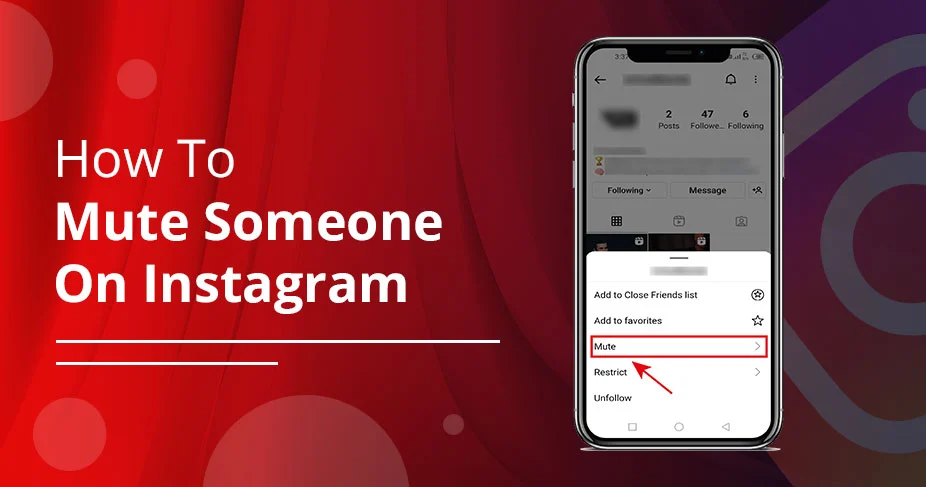
Instagram offers multiple pathways to mute accounts. Each method takes just seconds to complete.
Method 1: Mute From Profile
Navigate to the profile of the person you want to mute. You can search for them or tap their username from your feed.
Tap the “Following” button beneath their profile picture. This opens a menu with various options including the mute feature.
Select “Mute” from the options that appear. You’ll see toggles for Posts, Stories, and Notes.
Toggle on the content types you want to mute. You can mute posts only, stories only, or any combination of the three.
Method 2: Mute From Feed
When scrolling through your feed, find a post from the account you want to mute. Tap the three dots in the top right corner of their post.
Tap “Hide” from the options menu. This hides the specific post from your feed.
Instagram immediately asks if you want to mute the account. Choose between “Mute posts” or “Mute posts and stories.”
This quick method works perfectly when you encounter annoying content while scrolling. You don’t need to navigate to their profile separately.
Method 3: Mute Stories Directly
Before opening a story, press and hold the person’s story icon. A menu pops up with mute options.
Select “Mute story” to mute only their stories. Alternatively, choose “Mute story and posts” for comprehensive muting.
While viewing someone’s story, tap the three dots in the top right corner. This also provides mute options mid-viewing.
This method is ideal when someone’s story content specifically bothers you. It requires minimal navigation through Instagram’s interface.
Method 4: Bulk Muting from Following List
Go to your profile and tap “Following” to see accounts you follow. Tap the three-dot menu beside each profile name.
Select “Mute” and choose what content to mute. This method works efficiently when cleaning up multiple accounts.
Instagram displays your entire following list here. You can quickly review and mute multiple accounts in one session.
This bulk approach works best during periodic Instagram cleanups. Many users review their following list quarterly to optimize their feed.
Muting Direct Messages
Open your direct messages by tapping the messenger icon. Navigate to the conversation with the person you want to mute.
Tap their username at the top of the conversation. This opens their profile information and additional options.
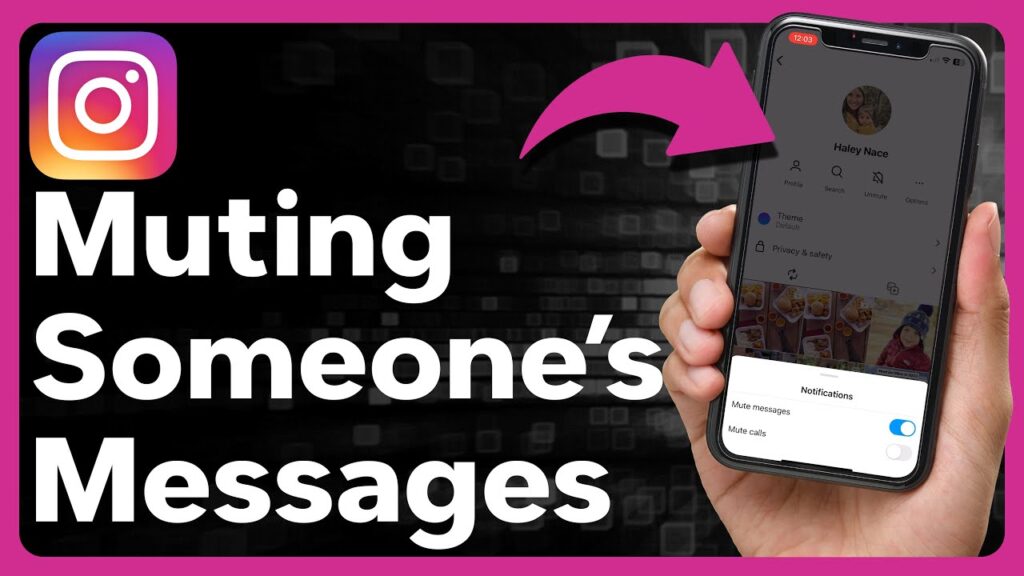
Tap the “Mute” button below their profile photo. Choose whether to mute messages, calls, or both.
Toggle the switches based on your preferences. You can mute messages without muting calls and vice versa.
What Happens After You Mute Someone
Understanding the complete effects of muting helps you use the feature effectively. Several specific changes occur immediately after muting.
Feed Changes
Their posts immediately stop appearing in your home feed. You won’t see their content when scrolling through Instagram normally.
The Instagram algorithm treats muted accounts differently. Their content gets completely excluded from your feed curation.
You’ll notice more content from other accounts. Instagram fills the space with posts from people you haven’t muted.
Your feed becomes more aligned with your current interests. Muting helps curate content that matters most to you.
Story Bar Changes
Muted story icons move to the end of your story bar. They appear after all non-muted accounts’ stories.
The icon appears grayed out or dimmed. This visual distinction helps you identify muted accounts quickly.
Muted stories never autoplay in sequence. When watching stories, Instagram skips over muted accounts automatically.
You can still manually tap to view them. The content isn’t deleted—it’s just deprioritized in your interface.
Notes Section Changes
Muted notes disappear from the top of your DM inbox. You won’t see their brief text updates anymore.
Other people’s notes still appear normally. Only the specifically muted account’s notes are hidden.
This feature launched more recently than post and story muting. It addresses the relatively new Notes feature on Instagram.
Notification Changes
You stop receiving notifications for their content. No alerts appear when they post new content to their feed.
Story notifications also cease if you mute their stories. You won’t get alerts when they update their Instagram Story.
Message notification muting is separate from content muting. You must specifically mute messages to stop DM notifications.
When messages are muted, you receive zero notifications. The message still arrives—you just don’t get alerted.
What DOESN’T Change When You Mute Someone
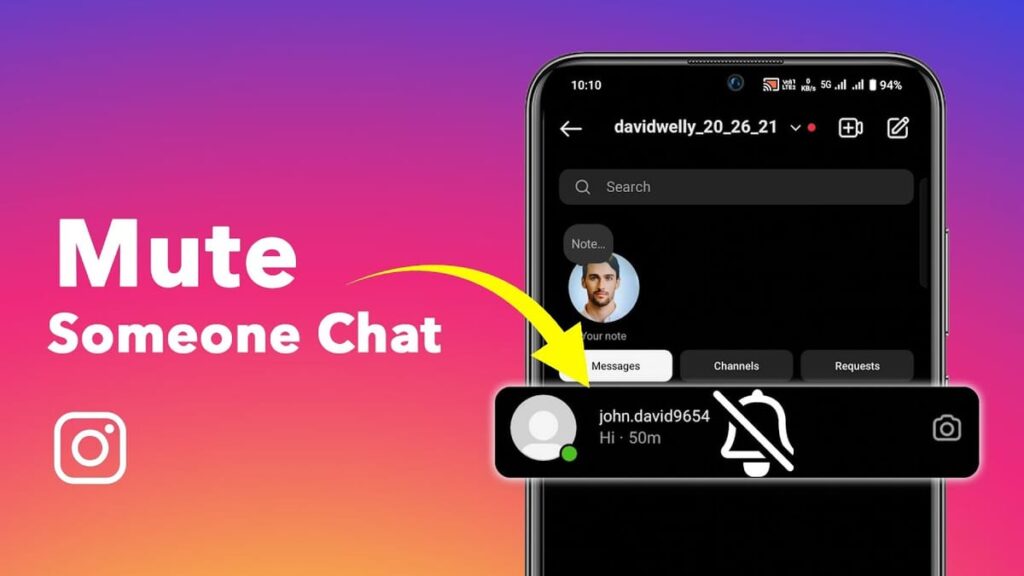
Muting creates surprisingly minimal disruption to the Instagram relationship. Most interactive features remain completely functional.
They Can Still See Your Content
Muted users see all your posts in their feed. Instagram doesn’t reciprocally hide your content from them.
They can view your stories normally. Your story appears in their story bar just as it did before.
Your notes remain visible to them. If you post Instagram Notes, muted accounts can see and reply to them.
This one-directional nature makes muting asymmetrical. It affects only what you see, not what they see.
They Can Still Interact With You
Muted users can like and comment on your posts. Their engagement appears exactly as it did before muting.
Comments from muted accounts are fully visible. Other users can see these comments, and you’ll receive notifications.
They can share your posts to their stories. Muting doesn’t restrict their sharing capabilities.
They can tag you in their posts and stories. You’ll receive tag notifications unless you’ve disabled them in settings.
Direct Messaging Remains Functional
Muted users can send you direct messages. The messages arrive in your inbox normally unless you’ve specifically muted messages.
They can see when you’ve read their messages. Read receipts continue functioning after you mute someone.
They can see your activity status. The green dot indicating you’re online remains visible to muted accounts.
Video and audio calls still come through. Unless you specifically mute calls, you’ll receive call notifications and can answer.
Profile Access Stays Unchanged
They can visit your profile anytime. Nothing prevents muted accounts from viewing your profile page.
They can see your follower count and following count. Profile statistics remain visible to muted users.
They can view your highlights. Story highlights on your profile are accessible to muted accounts.
Bio information and links remain accessible. Your profile link, bio text, and other information stays viewable.
Muting vs. Blocking vs. Restricting vs. Unfollowing
Instagram offers several relationship management tools. Understanding the differences helps you choose the right option for each situation.
Muting: The Softest Option
Muting is Instagram’s gentlest boundary-setting tool. It only affects what appears in your feed.
No one gets notified when you mute them. The relationship appears completely normal from their perspective.
You remain mutual followers after muting. Both of you show up in each other’s following/followers lists.
Full interaction remains possible. They can engage with your content, and you can engage with theirs.
Blocking: The Nuclear Option
Blocking is Instagram’s most severe action. It completely severs the connection between accounts.
Blocked users cannot find your profile. When they search for you, Instagram shows no results or an error message.
They lose the ability to view any of your content. Posts, stories, highlights, and reels become completely inaccessible.
Direct messages become impossible. Previous conversations may disappear, and new messages can’t be sent.
You disappear from their follower list. They’ll notice you’re no longer following them, making the block somewhat obvious.
Restricting: The Middle Ground
Restricting limits how someone interacts with you without fully blocking them. It’s designed as an anti-bullying tool.
Their comments become hidden to everyone but them. You can approve comments to make them visible to others.
Direct messages move to message requests. You won’t receive notifications when restricted users message you.
They can’t see when you’re active. Your activity status and read receipts are hidden from restricted accounts.
No notification alerts them to restriction. Like muting, restricting happens silently without alerting the other person.
Unfollowing: The Public Action
Unfollowing removes someone from your following list. This action is potentially visible and noticeable.
Their content disappears from your feed naturally. Since you’re not following them, Instagram doesn’t show their posts.
They may notice the follower count change. Many users monitor their follower count and notice decreases.
Your name disappears from their followers list. They can check who follows them and see you’re missing.
You can still visit their profile. Public accounts remain viewable even after unfollowing.
Why People Choose to Mute Others
Understanding common muting motivations helps normalize this privacy tool. Many valid reasons exist for muting someone on Instagram.
Avoiding Content Overload
Some people post excessively throughout the day. Seeing 10+ posts from one person can overwhelm your feed.
Muting prevents feed domination by heavy posters. This allows you to see content from a wider variety of accounts.
Your feed feels more balanced after muting frequent posters. Content diversity improves your Instagram experience significantly.
Maintaining Professional Relationships
Work colleagues often connect on Instagram. However, you may not want constant exposure to their personal content.
Muting preserves the professional connection. You remain followers, maintaining workplace social norms.
You avoid awkward conversations about unfollowing. Professional relationships stay intact without digital boundaries creating tension.
Protecting Mental Health
Some content negatively impacts mental wellbeing. Constant vacation photos, luxury purchases, or relationship posts can trigger comparison.
Muting protects you from comparison triggers. You maintain the relationship while protecting your emotional health.
Social media comparison damages mental health. Muting gives you control over potentially harmful content exposure.
Managing Ex-Relationships
Following ex-partners or ex-friends can be emotionally complicated. You may not want constant reminders of past relationships.
Muting allows time and space for healing. You’re not constantly confronted with their current life updates.
You avoid the drama of unfollowing or blocking. Muting keeps the separation private and drama-free.
Reducing Political or Controversial Content
Friends and family sometimes share content you disagree with. Political posts or controversial opinions can strain relationships.
Muting preserves the relationship while avoiding conflict. You stay connected without constant exposure to disagreeable viewpoints.
You maintain family harmony by muting rather than arguing. Digital boundaries prevent offline relationship damage.
Dealing with MLM or Spam Content
Some connections constantly post about multi-level marketing businesses. Endless product promotions clutter your feed unnecessarily.
Muting stops the spam without confrontation. You avoid awkward conversations about their business practices.
Your feed becomes more authentic. Reducing promotional content improves your overall Instagram experience.
How to Tell If Someone Muted You
Instagram intentionally keeps muting completely private. However, some indirect signs might suggest you’ve been muted.
Reduced Story Views
If someone previously viewed your stories regularly but suddenly never appears in your viewers list, they may have muted your stories.
Check your story viewer list for patterns. Consistent absence from someone who used to always view might indicate muting.
However, many innocent explanations exist. They might be less active on Instagram or simply not watching stories as frequently.
Decreased Engagement
Someone who regularly liked and commented on your posts suddenly stops engaging. This could indicate they’ve muted your posts.
However, algorithms also affect engagement. Instagram doesn’t show every post to every follower, reducing natural engagement.
Life changes also reduce engagement. People get busy, change interests, or simply scroll past content without malicious intent.
They Still Follow You
If engagement drops dramatically but they remain your follower, muting is more likely than unfollowing.
Check if they’re still in your followers list. Continued following despite zero engagement suggests possible muting.
This pattern is stronger when combined with other signs. One indicator alone isn’t definitive proof.
No Definitive Way to Know
Instagram provides no official “who muted me” feature. This privacy protection is intentional and permanent.
Third-party apps claiming to show who muted you violate Instagram’s terms of service. Avoid these apps to protect your account security.
Accept that you may never know for certain. This uncertainty is built into Instagram’s privacy design.
When to Use Each Privacy Feature
Different situations call for different Instagram privacy tools. Use this framework to choose the appropriate option.
Use Muting When:
You want to maintain the relationship appearance. Family members, colleagues, or casual acquaintances often fall into this category.
The person’s content simply doesn’t interest you. Boredom with their posts doesn’t require severing the connection.
You need temporary distance from someone’s content. Muting is easily reversible when you’re ready to see their content again.
You’re managing content overload from enthusiastic posters. Some people share too much, requiring feed management without relationship damage.
Use Restricting When:
Someone leaves negative or harassing comments. Restricting hides their comments from others while keeping them visible to the commenter.
You’re experiencing mild trolling or bullying. Restriction protects you without escalating to blocking.
You want to monitor someone’s behavior. Restricted users can still interact, allowing you to assess whether they improve.
You’re dealing with an awkward social situation. Restriction provides protection while avoiding the confrontation of blocking.
Use Blocking When:
Someone harasses or threatens you. Blocking provides maximum protection from harmful accounts.
An ex-partner won’t respect your boundaries. Complete disconnection sometimes becomes necessary for emotional health.
You’re experiencing serious bullying or stalking. Safety concerns always justify blocking without guilt.
Someone repeatedly violates your trust or privacy. Some behaviors warrant complete disconnection.
Use Unfollowing When:
You genuinely no longer want any connection. Unfollowing makes sense for accounts you simply don’t care about.
The account is public and you don’t mind them knowing. Unfollowing doesn’t hide the action, so use it when disclosure doesn’t matter.
You’re cleaning up your following list. Periodic unfollowing of inactive or irrelevant accounts improves feed quality.
How to Unmute Someone on Instagram
Changing your mind about muting is simple. Instagram makes unmuting as easy as the original muting process.
Unmuting Through Profile
Visit the profile of the person you muted. Navigate to their page just as you did when muting them.
Tap the “Following” button beneath their profile picture. The same menu appears with all your current settings.
Tap “Mute” again to access the mute settings. You’ll see which content types are currently muted.
Toggle off the content you want to unmute. Their posts, stories, or notes will immediately return to your feed.
Unmuting Messages
Open your conversation with the muted person. Navigate to your direct messages and find their chat.
Tap their username at the top of the conversation. This opens the same profile menu you used to mute them.
Tap “Mute” and toggle off message or call muting. Their notifications will resume immediately.
Finding Your Muted Accounts List
Instagram doesn’t provide a centralized “muted accounts” list like it does for blocked accounts. Finding muted accounts requires individual checking.
Manual Profile Checking
Visit profiles you suspect you’ve muted. Check the mute settings through the “Following” button on their profile.
This manual process can be time-consuming. If you’ve muted many accounts, finding them all requires significant effort.
Keep personal notes of muted accounts. Some users maintain a private list of muted accounts for easy reference.
Why No Centralized List Exists
Instagram deliberately avoids creating a muted accounts list. This design choice emphasizes muting’s privacy-focused nature.
A visible list might change how users approach muting. The lack of tracking encourages more liberal use of the mute feature.
This differs from blocked accounts which have a dedicated settings page. Blocking’s more serious nature warrants different tracking.
Instagram Mute Feature Updates in 2026
Instagram continues evolving its muting capabilities. Recent updates have expanded mute functionality significantly.
Notes Muting Addition
The ability to mute Instagram Notes was added relatively recently. This followed the Notes feature launch in late 2022.
Notes muting addresses excessive note updating. Some users change their notes multiple times daily, creating notification fatigue.
You can mute notes independently from posts and stories. This granular control reflects Instagram’s commitment to customization.
Enhanced Message Muting
Message muting now distinguishes between regular messages and calls. Previously, muting messages affected all DM notifications.
You can mute calls while keeping message notifications active. This flexibility accommodates different communication preferences.
Video calls and audio calls can be muted separately. Some users prefer text but will accept audio calls, for example.
Improved Mute Discovery
Instagram slightly improved how users discover the mute feature. Educational pop-ups occasionally appear explaining muting options.
The “Hide” button in feeds now more prominently leads to muting. This two-step process makes muting more discoverable.
However, Instagram still keeps muting relatively hidden. The feature remains more subtle than blocking or unfollowing.
Common Mistakes When Using Mute
Users sometimes misunderstand how muting works. Avoiding these common mistakes ensures the feature functions as intended.
Thinking Muting is Reciprocal
Many users assume muting hides their content from the muted person. This is incorrect—muting only affects what you see.
If you want to hide your content from someone, use Close Friends lists for stories. For posts, you’ll need to block or restrict them.
Muting is one-directional by design. This asymmetry confuses new users but is essential to the feature’s purpose.
Expecting Notification About Being Muted
Some users worry they’ll be notified if someone mutes them. Instagram never sends mute notifications to either party.
Your privacy is completely protected when muting. No one ever knows unless you tell them directly.
This privacy protection applies permanently. Instagram has never indicated plans to add mute notifications.
Confusing Muting With Unfollowing
Muting doesn’t change your following status. You remain followers with muted accounts.
Some users mute thinking it’s the same as unfollowing. They later discover they’re still following the account.
Check your following list if you want to actually unfollow. Muting and unfollowing are separate actions requiring separate steps.
Forgetting About Muted Accounts
Users sometimes forget they’ve muted someone. Months or years later, they wonder why they never see certain people’s content.
Periodically review your muting decisions. People change, circumstances evolve, and past muting reasons may no longer apply.
Set calendar reminders to review muted accounts quarterly. This ensures your feed reflects your current interests and relationships.
Privacy and Ethical Considerations
Using Instagram’s mute feature raises interesting questions about digital relationships and social norms. Understanding these nuances helps you use muting thoughtfully.
The Ethics of Silent Boundaries
Muting represents a form of social boundary-setting. You’re choosing what content you consume without explicit communication.
Some people view this as dishonest or passive-aggressive. They argue you should communicate boundaries directly or unfollow openly.
Others see muting as healthy self-care. Your feed is your personal space, and you’re entitled to curate it however you want.
Digital Authenticity Questions
Muting creates a gap between appearance and reality. You appear to be a supportive follower while actually ignoring someone’s content.
This raises authenticity questions in digital relationships. Are you being genuine if you follow someone but mute them?
However, authenticity doesn’t require consuming all content. You can care about someone while not wanting constant updates.
The Right to Curate Your Experience
Most social media experts support generous use of muting. Your mental health and time deserve protection.
Instagram isn’t reality—it’s a curated platform. Everyone makes choices about what they post and what they consume.
Muting is no different from not answering every phone call. You’re allowed to manage your digital boundaries.
When to Communicate Instead
Sometimes direct communication is better than muting. If someone’s content genuinely hurts or offends you, conversation might help.
Close friends and family often deserve honest feedback. “I need to mute your posts for my mental health” can strengthen relationships.
However, acquaintances and casual connections rarely need explanations. Mute freely without guilt in these situations.
Frequently Asked Questions (FAQs)
Does someone know if you mute them on Instagram?
No, Instagram never notifies someone when you mute them. The mute feature is completely private and discreet. The muted person retains full access to your profile, can see all your content, and can interact with your posts exactly as before, with no indication they’ve been muted.
Can someone still message you if you mute them on Instagram?
Yes, muting someone’s posts or stories doesn’t affect direct messaging. They can still send you messages, and those messages appear in your inbox normally. However, you can separately mute message notifications, which stops push alerts while still allowing messages to arrive in your DM inbox.
What’s the difference between muting and blocking on Instagram?
Muting hides someone’s content from your feed while maintaining the follow relationship. Blocking completely severs the connection—blocked users cannot find your profile, view your content, or message you. Muting is private and reversible, while blocking is noticeable and more permanent.
Can you mute only stories and not posts on Instagram?
Yes, Instagram allows granular control over what you mute. You can mute only posts, only stories, only notes, or any combination of the three. This flexibility lets you customize exactly what content you see from each account without an all-or-nothing approach.
Will muted posts still show in your feed occasionally?
No, once you mute someone’s posts, they completely disappear from your home feed. Instagram’s algorithm removes muted accounts entirely from your feed curation. The only way to see their content is by manually visiting their profile, where all posts remain fully accessible.
Can you see if someone muted you on Instagram?
No, Instagram provides no official way to see who has muted you. The platform deliberately keeps this information private to prevent confrontation. While decreased engagement might suggest muting, many innocent explanations exist, and you cannot confirm muting status through any official Instagram feature.
How do you unmute someone on Instagram?
Visit their profile and tap the “Following” button, then select “Mute.” You’ll see toggles showing which content types are currently muted. Simply toggle off posts, stories, or notes to unmute them. Changes take effect immediately, and their content will reappear in your feed.
Does muting someone hide your posts from them?
No, muting is one-directional and only affects what you see. When you mute someone, they still see all your posts, stories, and notes in their feed normally. If you want to hide your content from someone, use the “Close Friends” feature for stories or consider blocking/restricting them.
What happens to old messages when you mute someone on Instagram?
Old messages remain completely unchanged when you mute someone. Muting message notifications only prevents future notification alerts—it doesn’t delete, hide, or affect existing conversations. All previous messages stay visible in your DM inbox exactly as they were before muting.
Can you bulk mute multiple accounts at once on Instagram?
Instagram doesn’t offer a bulk mute feature in one action. However, you can visit your Following list (from your profile), then tap the three-dot menu beside each account name to mute them. This allows relatively quick muting of multiple accounts in one session, though each requires individual action.
Conclusion
What does muting someone on Instagram do? It provides the perfect balance between maintaining social connections and protecting your digital wellbeing.
This private, discreet feature lets you hide posts, stories, and notes from specific accounts without unfollowing, notifying them, or affecting their ability to interact with your content.
Whether you’re managing content overload from enthusiastic posters, creating emotional boundaries with ex-partners, reducing exposure to controversial content from family members, or simply curating a feed that aligns with your current interests, muting offers the flexibility you need.
In 2026, Instagram continues enhancing the mute feature with options to separately mute posts, stories, notes, messages, and calls—giving you unprecedented granular control.